 Fourteener
Features
Everything a service business runs on, in one system
Quotes and jobs, invoices and payments, bills, Colorado sales tax, a real general ledger, workflows and an AI assistant. One login, one set of numbers.
Win work · CRM add-on
Leads, a pipeline and follow-ups
An add-on for $300 per month on any plan, on the same customers and quotes as your books. See pricing.
Leads to customers
Every lead keeps where it came from. Converting one makes the customer, or links the one you already have with the same email, and brings its people, deals and history along. Website and phone leads arrive on their own through the API.
A pipeline that becomes quotes
Your own stages, each with its chance of closing, for a weighted forecast. A deal becomes a normal quote from your price list in one click, and when the client accepts it the deal is marked won at the accepted total.
People and history
Several contacts per customer, one of them primary, and every call, email, meeting and note on the customer, lead or deal it belongs to.
Follow-ups and sales reports
Tasks with due dates, a list of what is overdue, and reports on pipeline by stage, win rate, expected closes by month and which lead sources turn into customers. Workflows can start when a lead arrives or a deal is won or lost.
Sell
Quotes, jobs and time
Everything from the first number you give a client to the work getting done.
Price list
Hourly work with your billing increments and minimums, fixed-price jobs, monthly plans and parts, each mapped to its income account. Parts are taxable; services follow Colorado rules.
Quotes clients pick from
Heading lines, required lines and optional extras. When a quote is accepted, only the ticked lines carry forward, a job opens, and the deposit invoice posts.
Jobs and time
Each accepted quote becomes a job that moves from open to scheduled, in progress, done and invoiced. Time is recorded against the job at the rate it belongs to.
Final invoices
Made from the accepted quote with one click, carrying only the lines the client chose and deducting any deposit already paid.
Deposits
A deposit percent on every quote (50% unless you change it), posted as its own invoice and held as a customer deposit until the final invoice uses it.
Customers
Terms per customer, a delivery address that decides the sales tax, and every quote, invoice and payment for them in one place.
Get paid
Payments that book themselves
Money in, matched to the right invoice, with the fees where your accountant expects them.
Stripe card and ACH
Each Stripe payment is booked once, even if Stripe sends it twice: applied to its invoice, the processing fee recorded as an expense, and a card fee you pass to the client recorded as income.
Checks and transfers
Record any payment against a posted invoice or deposit in a couple of clicks. Partial payments keep the rest open.
Receivables you can act on
Aging buckets, an overdue list on the dashboard, and reminder workflows that can wait for your approval before they email anyone.
Spend
Bills and vendors
What you owe, posted to the right expense account.
Vendor bills
Bills with a default expense account per vendor, vendor reference numbers checked so the same bill is never entered twice, and due dates from the vendor’s terms.
Approval over your limit
With the ready-made workflow, bills of $500 or less post on their own and larger ones wait for an owner’s OK. Change the limit to suit you.
1099 vendors
Vendors carry a 1099 flag, so you know who needs one at year end.
Tax
Colorado sales tax by address
Colorado has state, county, special district and home-rule city taxes. Fourteener keeps each one separate.
Every jurisdiction on its own line
An invoice works out each tax for the delivery address and posts each one separately, so the totals by jurisdiction are always there.
Who you remit to
Each jurisdiction records who collects it: the Colorado Department of Revenue, or a self-collecting home-rule city such as Colorado Springs.
Dated rates
Rates carry effective dates, so a rate change applies from the day it starts and older invoices keep the rate they were issued with.
Books
A general ledger you can trust
The accounting is the core, not an add-on.
Balanced or refused
Every money movement is one double-entry journal entry in whole cents. An entry that doesn’t balance is refused before it reaches the database.
Never edited, only reversed
Posted entries are permanent. A correction is a reversing entry, and periods you lock stay locked.
Standard reports
Profit and loss, balance sheet, trial balance and receivables aging, for any dates you pick.
Automate
Workflows and approvals
Rules that run the routine work, with a person in charge of anything that matters.
Twenty ready-made workflows
Overdue reminders, quote follow-ups, deposit reminders, job-done invoicing, monthly plan billing, thank-you notes and more. Add one as a draft, adjust it, publish it.
- Triggers: quotes sent, accepted or expiring; invoices posted, overdue or paid; payments; job status; new bills and customers
- Steps: wait, wait for an event, ask for approval, email the client or your staff, draft or post an invoice, post a bill, set a job status, call another system
Test before it runs
Replay a draft against the last 90 days of your real history and see each email it would have sent and each amount it would have posted. Nothing is sent during a test.
Approvals
A step that emails a client or moves money can wait for your OK. You see exactly what will happen, then approve or decline. Every run and decision is recorded.
AI
The assistant (Plus and All-inclusive)
Claude, working on your books through tools, with a person confirming every change.
Ask in plain English
Who owes us money, oldest first? What did we bill by customer this year? The assistant answers from your own data through read-only tools.
Prepares, never posts on its own
It can prepare customers, quotes, invoices, payments, bills and workflows as cards. Nothing changes until someone with the right role confirms; a card runs once and expires after 24 hours.
Custom reports and workflows
Ask for a report and it is saved as its own page that re-runs live. Describe a workflow in a sentence and it drafts one for you to test and publish.
Connect
Moving in and working with other systems
Bring your history, and let your other tools talk to Fourteener.
QuickBooks import
Your chart of accounts, customers, vendors, items, open invoices and bills, and the trial balance as one opening entry, from QuickBooks Online or Desktop CSV exports. No Intuit account needed, and a dry run lists every problem before anything is written.
API and webhooks
A REST API with scoped, revocable keys for quotes, invoices, payments, customers and bills, and signed webhooks from your workflows to the systems you allow.
Unlimited users and roles
Owners, accountants, staff and read-only viewers. Sign in with Microsoft 365, or with an email and password.
At a glance
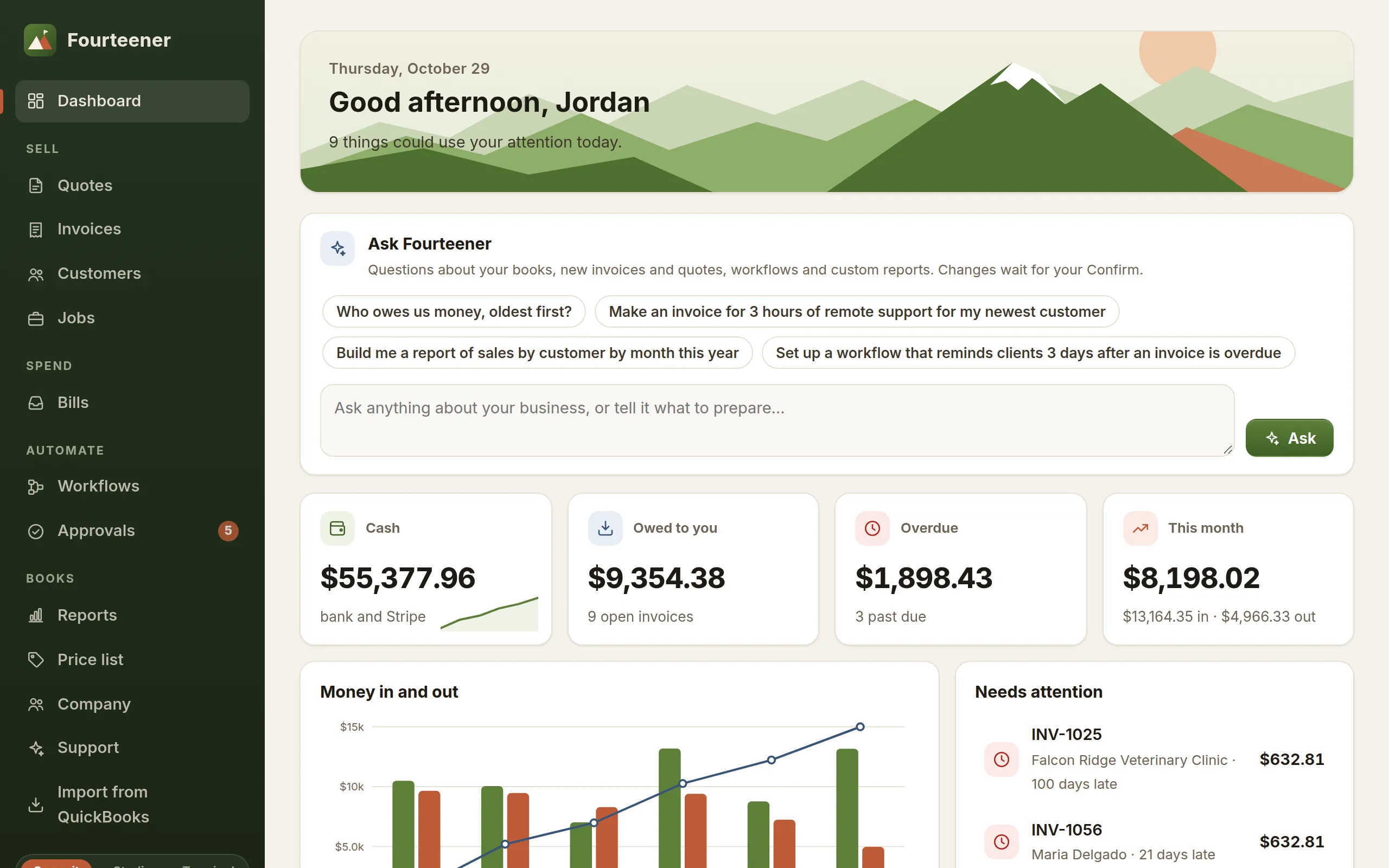
The day starts on the dashboard
Cash, what you’re owed, what’s overdue and this month’s profit, six months of money in and out, and a short list of what needs you today: overdue invoices, quotes about to expire and approvals waiting.
Book a demo
See it on your own process
Twenty minutes. We start with how you quote and bill today, then show you the same steps in Fourteener.